 .
.
Investigating the historical running data to evaluate my performance (Session summaries)#
Many runners use third-party apps to track running activities. These apps and its companion website provide many visual charts with analytical metrics to help runners review their running performances to set up new training plans or make adjustments. In this notebook, we will extract this running data and analyse it locally using runpandas. We also take the opportunity to illustrate the runpandas methods for summarizing the historical workouts and get some valuable insights.
Looking at the data#
The example data set used in this tutorial contains 68 sessions of a single female runner from the period of 2020 until 2021.
The code chunk below loads the data using the method runpandas.read_directory_aggregate, which allows the user to read all the tracking files of a support format in a directory and combine them in a data frame split by sessions based on the timestamps of each activity. It means that for each workout file will be stored in separate lines in the dataframe.
[2]:
import warnings
warnings.filterwarnings('ignore')
[3]:
import runpandas
session = runpandas.read_dir_aggregate(dirname='session/')
In pandas we use the pandas.MultiIndex which alows the dataframe have multiple columns as a row identifier, while having each index column related to another through a parent/child relationship. In our scenario we have the start time from each activity as the first index level and the timestamps from the activity as the second index level.
[4]:
session
[4]:
| alt | hr | lon | lat | ||
|---|---|---|---|---|---|
| start | time | ||||
| 2020-08-30 09:08:51.012 | 00:00:00 | NaN | NaN | -34.893609 | -8.045055 |
| 00:00:01.091000 | NaN | NaN | -34.893624 | -8.045054 | |
| 00:00:02.091000 | NaN | NaN | -34.893641 | -8.045061 | |
| 00:00:03.098000 | NaN | NaN | -34.893655 | -8.045063 | |
| 00:00:04.098000 | NaN | NaN | -34.893655 | -8.045065 | |
| ... | ... | ... | ... | ... | ... |
| 2021-07-04 11:23:19.418 | 00:52:39.582000 | 0.050001 | 189.0 | -34.894534 | -8.046602 |
| 00:52:43.582000 | NaN | NaN | -34.894465 | -8.046533 | |
| 00:52:44.582000 | NaN | NaN | -34.894443 | -8.046515 | |
| 00:52:45.582000 | NaN | NaN | -34.894429 | -8.046494 | |
| 00:52:49.582000 | NaN | 190.0 | -34.894395 | -8.046398 |
48794 rows × 4 columns
[5]:
session.index #MultiIndex (start, timestamp)
[5]:
MultiIndex([('2020-08-30 09:08:51.012000',        '00:00:00'),
            ('2020-08-30 09:08:51.012000', '00:00:01.091000'),
            ('2020-08-30 09:08:51.012000', '00:00:02.091000'),
            ('2020-08-30 09:08:51.012000', '00:00:03.098000'),
            ('2020-08-30 09:08:51.012000', '00:00:04.098000'),
            ('2020-08-30 09:08:51.012000', '00:00:05.096000'),
            ('2020-08-30 09:08:51.012000', '00:00:06.096000'),
            ('2020-08-30 09:08:51.012000', '00:00:07.097000'),
            ('2020-08-30 09:08:51.012000', '00:00:08.097000'),
            ('2020-08-30 09:08:51.012000', '00:00:09.102000'),
            ...
            ('2021-07-04 11:23:19.418000', '00:52:18.584000'),
            ('2021-07-04 11:23:19.418000', '00:52:22.584000'),
            ('2021-07-04 11:23:19.418000', '00:52:26.582000'),
            ('2021-07-04 11:23:19.418000', '00:52:30.582000'),
            ('2021-07-04 11:23:19.418000', '00:52:35.582000'),
            ('2021-07-04 11:23:19.418000', '00:52:39.582000'),
            ('2021-07-04 11:23:19.418000', '00:52:43.582000'),
            ('2021-07-04 11:23:19.418000', '00:52:44.582000'),
            ('2021-07-04 11:23:19.418000', '00:52:45.582000'),
            ('2021-07-04 11:23:19.418000', '00:52:49.582000')],
           names=['start', 'time'], length=48794)
Now let’s see how many activities there are available for analysis. For this question, we also have an acessor runpandas.types.acessors.session._SessionAcessor that holds several methods for computing the basic running metrics across all the activities and some summary statistics.
[6]:
#count the number of activities in the session
print ('Total Activities:', session.session.count())
Total Activities: 68
We can compute the main running metrics (speed, pace, moving, etc) using the session methods available as like the ones available in the runpandas.types.metrics.MetricsAcessor . By the way, those methods are called inside each metric method, but applying in each of activities separatedely.
[7]:
#In this example we compute the distance and the distance per position across all workouts
session = session.session.distance()
session
[7]:
| alt | hr | lon | lat | distpos | dist | ||
|---|---|---|---|---|---|---|---|
| start | time | ||||||
| 2020-08-30 09:08:51.012 | 00:00:00 | NaN | NaN | -34.893609 | -8.045055 | NaN | NaN |
| 00:00:01.091000 | NaN | NaN | -34.893624 | -8.045054 | 1.690587 | 1.690587 | |
| 00:00:02.091000 | NaN | NaN | -34.893641 | -8.045061 | 2.095596 | 3.786183 | |
| 00:00:03.098000 | NaN | NaN | -34.893655 | -8.045063 | 1.594298 | 5.380481 | |
| 00:00:04.098000 | NaN | NaN | -34.893655 | -8.045065 | 0.163334 | 5.543815 | |
| ... | ... | ... | ... | ... | ... | ... | ... |
| 2021-07-04 11:23:19.418 | 00:52:39.582000 | 0.050001 | 189.0 | -34.894534 | -8.046602 | 12.015437 | 8220.018885 |
| 00:52:43.582000 | NaN | NaN | -34.894465 | -8.046533 | 10.749779 | 8230.768664 | |
| 00:52:44.582000 | NaN | NaN | -34.894443 | -8.046515 | 3.163638 | 8233.932302 | |
| 00:52:45.582000 | NaN | NaN | -34.894429 | -8.046494 | 2.851535 | 8236.783837 | |
| 00:52:49.582000 | NaN | 190.0 | -34.894395 | -8.046398 | 11.300740 | 8248.084577 |
48794 rows × 6 columns
[8]:
#comput the speed for each activity
session = session.session.speed(from_distances=True)
#compute the pace for each activity
session = session.session.pace()
#compute the inactivity periods for each activity
session = session.session.only_moving()
[9]:
session
[9]:
| alt | hr | lon | lat | distpos | dist | speed | pace | moving | ||
|---|---|---|---|---|---|---|---|---|---|---|
| start | time | |||||||||
| 2020-08-30 09:08:51.012 | 00:00:00 | NaN | NaN | -34.893609 | -8.045055 | NaN | NaN | NaN | NaT | False |
| 00:00:01.091000 | NaN | NaN | -34.893624 | -8.045054 | 1.690587 | 1.690587 | 1.549576 | 00:00:00.645337 | True | |
| 00:00:02.091000 | NaN | NaN | -34.893641 | -8.045061 | 2.095596 | 3.786183 | 2.095596 | 00:00:00.477191 | True | |
| 00:00:03.098000 | NaN | NaN | -34.893655 | -8.045063 | 1.594298 | 5.380481 | 1.583216 | 00:00:00.631625 | True | |
| 00:00:04.098000 | NaN | NaN | -34.893655 | -8.045065 | 0.163334 | 5.543815 | 0.163334 | 00:00:06.122433 | False | |
| ... | ... | ... | ... | ... | ... | ... | ... | ... | ... | ... |
| 2021-07-04 11:23:19.418 | 00:52:39.582000 | 0.050001 | 189.0 | -34.894534 | -8.046602 | 12.015437 | 8220.018885 | 3.003859 | 00:00:00.332905 | True |
| 00:52:43.582000 | NaN | NaN | -34.894465 | -8.046533 | 10.749779 | 8230.768664 | 2.687445 | 00:00:00.372100 | True | |
| 00:52:44.582000 | NaN | NaN | -34.894443 | -8.046515 | 3.163638 | 8233.932302 | 3.163638 | 00:00:00.316091 | True | |
| 00:52:45.582000 | NaN | NaN | -34.894429 | -8.046494 | 2.851535 | 8236.783837 | 2.851535 | 00:00:00.350688 | True | |
| 00:52:49.582000 | NaN | 190.0 | -34.894395 | -8.046398 | 11.300740 | 8248.084577 | 2.825185 | 00:00:00.353959 | True |
48794 rows × 9 columns
After all the computation done, let’s going to the next step: the exploration and get some descriptive statistics.
Exploring the data#
After the loading and metrics computation for all the activities, now let’s look further the data and get the basic summaries about the sessions: time spent, total distance, mean speed and other insightful statistics in each running activity. For this task, we may accomplish it by calling the method runpandas.types.session._SessionAcessor.summarize . It will return a basic Dataframe including all the aggregated statistics per activity from the season frame.
[10]:
summary = session.session.summarize()
summary
[10]:
| moving_time | mean_speed | max_speed | mean_pace | max_pace | mean_moving_speed | mean_moving_pace | mean_cadence | max_cadence | mean_moving_cadence | mean_heart_rate | max_heart_rate | mean_moving_heart_rate | mean_temperature | min_temperature | max_temperature | total_distance | ellapsed_time | |
|---|---|---|---|---|---|---|---|---|---|---|---|---|---|---|---|---|---|---|
| start | ||||||||||||||||||
| 2020-07-03 09:50:53.162 | 00:25:29.838000 | 2.642051 | 4.879655 | 00:06:18 | 00:03:24 | 2.665008 | 00:06:15 | NaN | NaN | NaN | 178.819923 | 188.0 | 178.872587 | NaN | NaN | NaN | 4089.467333 | 00:25:47.838000 |
| 2020-07-05 09:33:20.999 | 00:05:04.999000 | 2.227637 | 6.998021 | 00:07:28 | 00:02:22 | 3.072098 | 00:05:25 | NaN | NaN | NaN | 168.345455 | 176.0 | 168.900000 | NaN | NaN | NaN | 980.162640 | 00:07:20.001000 |
| 2020-07-05 09:41:59.999 | 00:18:19 | 1.918949 | 6.563570 | 00:08:41 | 00:02:32 | 2.729788 | 00:06:06 | NaN | NaN | NaN | 173.894180 | 185.0 | 174.577143 | NaN | NaN | NaN | 3139.401118 | 00:27:16 |
| 2020-07-13 09:13:58.718 | 00:40:21.281000 | 2.509703 | 8.520387 | 00:06:38 | 00:01:57 | 2.573151 | 00:06:28 | NaN | NaN | NaN | 170.808176 | 185.0 | 170.795527 | NaN | NaN | NaN | 6282.491059 | 00:41:43.281000 |
| 2020-07-17 09:33:02.308 | 00:32:07.691000 | 2.643278 | 8.365431 | 00:06:18 | 00:01:59 | 2.643278 | 00:06:18 | NaN | NaN | NaN | 176.436242 | 186.0 | 176.436242 | NaN | NaN | NaN | 5095.423045 | 00:32:07.691000 |
| ... | ... | ... | ... | ... | ... | ... | ... | ... | ... | ... | ... | ... | ... | ... | ... | ... | ... | ... |
| 2021-06-13 09:22:30.985 | 01:32:33.018000 | 2.612872 | 23.583956 | 00:06:22 | 00:00:42 | 2.810855 | 00:05:55 | NaN | NaN | NaN | 169.340812 | 183.0 | 169.655879 | NaN | NaN | NaN | 15706.017295 | 01:40:11.016000 |
| 2021-06-20 09:16:55.163 | 00:59:44.512000 | 2.492640 | 6.065895 | 00:06:41 | 00:02:44 | 2.749453 | 00:06:03 | NaN | NaN | NaN | 170.539809 | 190.0 | 171.231392 | NaN | NaN | NaN | 9965.168311 | 01:06:37.837000 |
| 2021-06-23 09:37:44.000 | 00:26:49.001000 | 2.501796 | 5.641343 | 00:06:39 | 00:02:57 | 2.568947 | 00:06:29 | NaN | NaN | NaN | 156.864865 | 171.0 | 156.957031 | NaN | NaN | NaN | 4165.492241 | 00:27:45.001000 |
| 2021-06-27 09:50:08.664 | 00:31:42.336000 | 2.646493 | 32.734124 | 00:06:17 | 00:00:30 | 2.661853 | 00:06:15 | NaN | NaN | NaN | 166.642857 | 176.0 | 166.721116 | NaN | NaN | NaN | 5074.217061 | 00:31:57.336000 |
| 2021-07-04 11:23:19.418 | 00:47:47.583000 | 2.602263 | 4.212320 | 00:06:24 | 00:03:57 | 2.856801 | 00:05:50 | NaN | NaN | NaN | 177.821862 | 192.0 | 177.956967 | NaN | NaN | NaN | 8248.084577 | 00:52:49.582000 |
68 rows × 18 columns
Here, some descriptive statistics:
[11]:
summary['day_diff'] = summary.index.to_series().diff().astype('timedelta64[D]').astype('Int64')
summary['pace_moving_all_mean'] = summary.mean_moving_pace.mean()
summary['distance_all_mean'] = round(summary.total_distance.mean()/1000,2)
summary['mean_speed'] = summary['mean_speed'] * 3.6 #convert from m/s  to km/h
summary['max_speed'] = summary['max_speed'] * 3.6 #convert from m/s  to km/h
summary['mean_moving_speed'] = summary['mean_moving_speed'] * 3.6 #convert from m/s  to km/h
[12]:
print('Session Interval:', (summary.index.to_series().max() - summary.index.to_series().min()).days, 'days')
print('Total Workouts:', len(summary), 'runnings')
print('Tota KM Distance:', summary['total_distance'].sum() / 1000)
print('Running Intervals (average):' , round(summary.day_diff.mean(), 2), 'days')
print('Average Pace (all runs):', summary.mean_pace.mean())
print('Average Moving Pace (all runs):', summary.mean_moving_pace.mean())
print('Average KM Distance (all runs):', round(summary.total_distance.mean()/ 1000,2))
Session Interval: 366 days
Total Workouts: 68 runnings
Tota KM Distance: 491.77377537338896
Running Intervals (average): 5.0 days
Average Pace (all runs): 0 days 00:07:18.411764
Average Moving Pace (all runs): 0 days 00:06:02.147058
Average KM Distance (all runs): 7.23
As we can see above, we analyzed the period of 366 days (one year) of running workouts. In this period, she ran 68 times which achieved the total distance of 491 km! The average interval in days between two actitivies is 5 days, with average moving pace of 06’02” per km and average distance of 7.23km! Great numbers for a starter runner!
Exploring the data with some visualizations#
At this point, I have the data to start some visualization and analysis. The first question that popped was : How was the evolution of my average moving pace through all the runs and the corresponding average? Let’s use the matplotlib package to illustrate the possible answer.
[13]:
#let's convert the pace to float number in minutes
import datetime
summary['mean_moving_pace_float'] = summary['mean_moving_pace'] / datetime.timedelta(minutes=1)
summary['pace_moving_all_mean_float'] = summary['pace_moving_all_mean'] / datetime.timedelta(minutes=1)
#replace NA values with 0
summary['day_diff'].fillna(0, inplace=True)
[14]:
import matplotlib.pyplot as plt

plt.subplots(figsize=(8, 5))

plt.plot(summary.index, summary.mean_moving_pace_float, color='silver')
plt.plot(summary.pace_moving_all_mean_float, color='purple', linestyle='dashed', label='average')
plt.title("Pace Evolution")
plt.xlabel("Runnings")
plt.ylabel("Pace")
plt.legend()
[14]:
<matplotlib.legend.Legend at 0x7fa8d8d28b50>
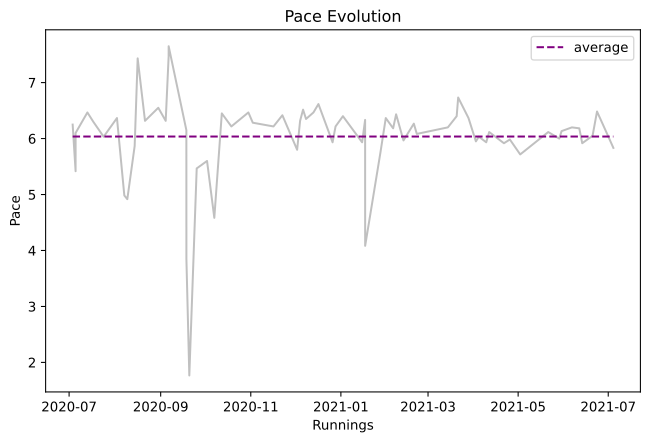
We can see some outliers at the running workouts at september 2020. Let’s do some filtering (excluding those with “unreasonable” paces that might be mislabelled)
[15]:
summary_without_outliers = summary[summary['mean_moving_pace_float'].between(5,10)]

plt.plot(summary_without_outliers.index, summary_without_outliers.mean_moving_pace_float, color='silver')
plt.plot(summary_without_outliers.pace_moving_all_mean_float, color='purple', linestyle='dashed', label='average')
plt.title("Pace Evolution")
plt.xlabel("Runnings")
plt.xticks(rotation=90)
plt.ylabel("Pace")
plt.legend()
[15]:
<matplotlib.legend.Legend at 0x7fa8d916ac10>
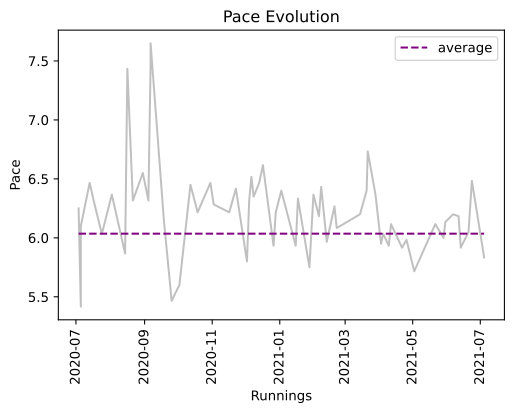
That looks much better now. Now we can see clearly that her pace kept floating between 6’50 min and 6’00 min over all this year. I also created a new variable at my summary dataframe called day_diff, which means the interval in day between consecutive workouts. This variable helped me to see if her pace grew up as the number of the days without running also increased.
[16]:
#recompute the day_diff removing the outliers
summary_without_outliers['day_diff'] = summary_without_outliers.index.to_series().diff().astype('timedelta64[D]').astype('Int64')
summary_without_outliers['day_diff'].fillna(0, inplace=True)

fig,ax = plt.subplots(figsize=(8, 5))
ax.plot(summary_without_outliers.index, summary_without_outliers.mean_moving_pace_float, color='silver')
ax.set_xlabel('Runnings')
ax.set_ylabel('Pace',color='silver')
ax2=ax.twinx()
ax2.plot(summary_without_outliers.index, summary_without_outliers.day_diff.astype('int'),color='purple')
ax2.set_ylabel('Days Without Running',color='indigo', rotation=270)
plt.title('Pace vs Days without Running')
plt.show()
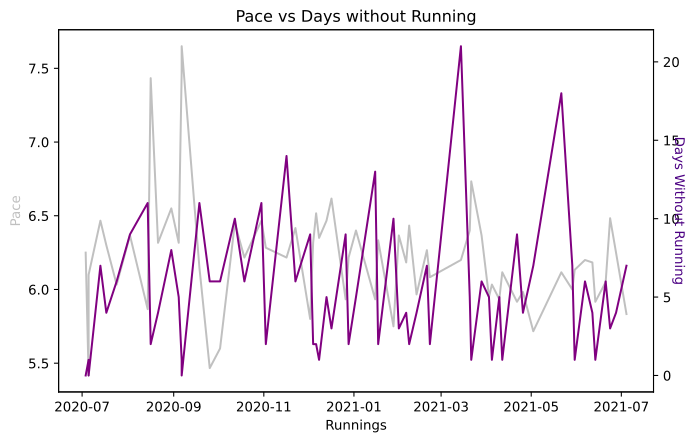
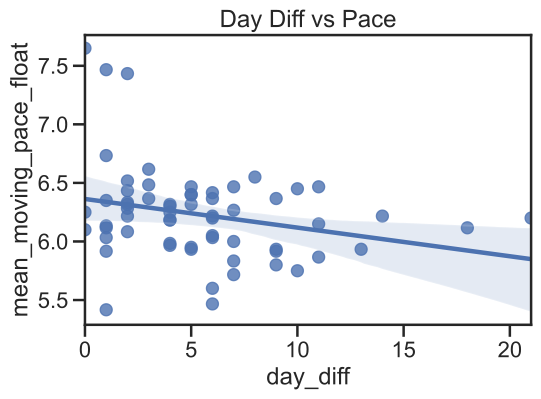
As we can see at the chart above, there isn’t a linear correlation between the number of the days without running and her growing pace. In her case it might be the period of rest helped her to a better recovery. Can we have a statistical evidence ?
The following code will create a regression plot of her interval of days vs pace. I will use Seaborn to create plot. As we can see there is negative correlation between the two variables, although, it’s not strong.
[17]:
import seaborn as sns
sns.set(style="ticks", context="talk")
sns.regplot(x=summary_without_outliers.day_diff.astype('int'), y=summary_without_outliers.mean_moving_pace_float).set_title("Day Diff vs Pace")
[17]:
Text(0.5, 1.0, 'Day Diff vs Pace')
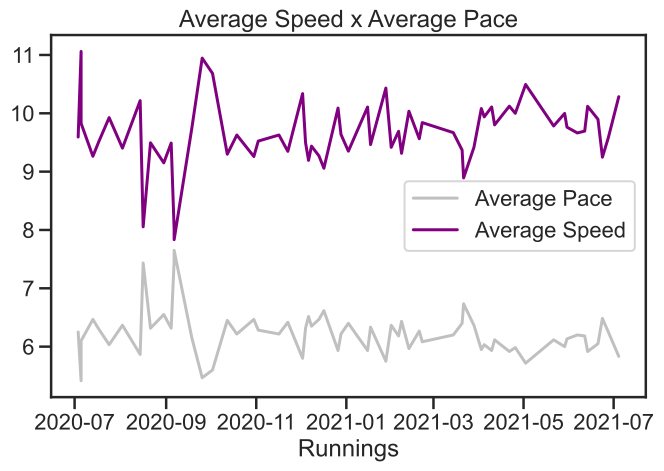
Let’s explore now the relationship between the mean pace and the average speed. It is obvious that the bigger the average speed the pace is lower. More fast means less time to cover the distance.
[18]:
plt.subplots(figsize=(8, 5))

plt.plot(summary_without_outliers.index, summary_without_outliers.mean_moving_pace_float, color='silver', label='Average Pace')
plt.plot(summary_without_outliers.mean_moving_speed, color='purple', label = 'Average Speed')
plt.title("Average Speed x Average Pace")
plt.xlabel("Runnings")
plt.legend()
plt.show()
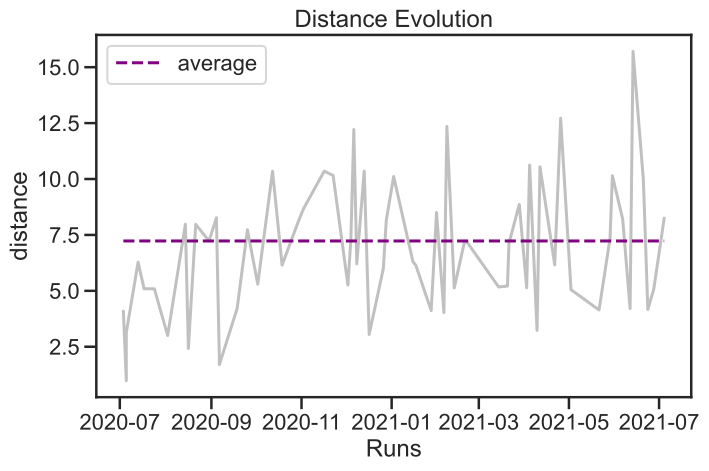
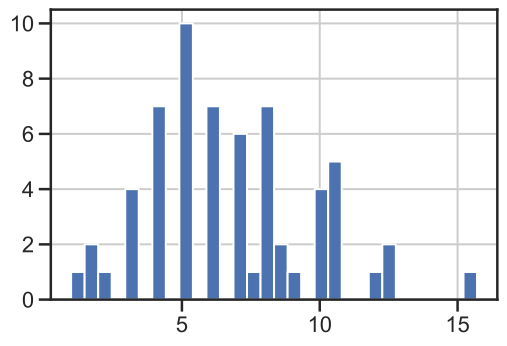
The chart below illustrates the evolution of the total distance covered at her runnings workouts. There is a higher variance of her run distances. The average distance for most of the runs is close to 7km. The second chart illustrating the histogram of the run distances show that most of her usual weekday runs are around 4-7km and my longer weekend runs (she started to run longer distances above 7kms very recently).
[19]:
plt.subplots(figsize=(8, 5))

plt.plot(summary_without_outliers.index, summary_without_outliers.total_distance / 1000, color='silver')
plt.plot(summary_without_outliers.distance_all_mean, color='purple', linestyle='dashed', label='average')
plt.title("Distance Evolution")
plt.xlabel("Runs")
plt.ylabel("distance")
plt.legend()


plt.show()
[20]:
(summary_without_outliers['total_distance'] / 1000.0).hist(bins=30)
[20]:
<AxesSubplot:>
Now let’s see how faster she was and if there is a distinction between longer and shorter runs related to the speed (slower vs faster). Let’s try plotting distance against speed to get a better idea.
[21]:
plt.subplots(figsize=(8, 5))

plt.scatter(summary_without_outliers.total_distance/ 1000, summary_without_outliers.mean_moving_pace_float, color='purple', marker='s')
plt.title("Distance vs. pace")
plt.xlabel("Distance")
plt.ylabel("Pace")
plt.legend()
No handles with labels found to put in legend.
[21]:
<matplotlib.legend.Legend at 0x7fa8da85bf40>
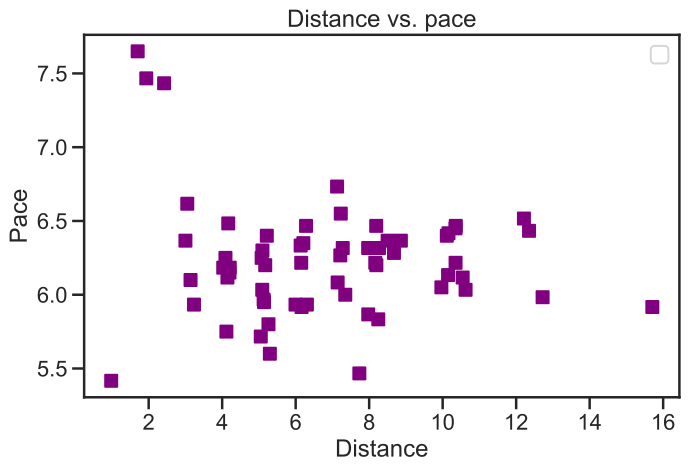
The distribution of her pace across the distance runs is very dispersed. It means a no clear trend there. But what if we restrict it just to this year ?
[22]:
summary_without_outliers_2021 = summary_without_outliers[summary_without_outliers.index > '2021-01-01']
[23]:
summary_without_outliers_2021
[23]:
| moving_time | mean_speed | max_speed | mean_pace | max_pace | mean_moving_speed | mean_moving_pace | mean_cadence | max_cadence | mean_moving_cadence | ... | mean_temperature | min_temperature | max_temperature | total_distance | ellapsed_time | day_diff | pace_moving_all_mean | distance_all_mean | mean_moving_pace_float | pace_moving_all_mean_float | |
|---|---|---|---|---|---|---|---|---|---|---|---|---|---|---|---|---|---|---|---|---|---|
| start | |||||||||||||||||||||
| 2021-01-02 09:07:36.900 | 01:04:45 | 9.244853 | 68.900544 | 00:06:29 | 00:00:52 | 9.351208 | 00:06:24 | NaN | NaN | NaN | ... | NaN | NaN | NaN | 10113.098986 | 01:05:38.100000 | 5 | 00:06:02.147058 | 7.23 | 6.400000 | 6.035784 |
| 2021-01-15 09:08:54.810 | 00:37:22.191000 | 10.048012 | 152.739973 | 00:05:58 | 00:00:23 | 10.106837 | 00:05:56 | NaN | NaN | NaN | ... | NaN | NaN | NaN | 6305.660653 | 00:37:39.191000 | 13 | 00:06:02.147058 | 7.23 | 5.933333 | 6.035784 |
| 2021-01-17 09:41:25.270 | 00:38:41.730000 | 9.321227 | 23.778071 | 00:06:26 | 00:02:31 | 9.464527 | 00:06:20 | NaN | NaN | NaN | ... | NaN | NaN | NaN | 6135.777736 | 00:39:29.731000 | 2 | 00:06:02.147058 | 7.23 | 6.333333 | 6.035784 |
| 2021-01-27 18:24:14.001 | 00:23:40 | 10.432233 | 20.445663 | 00:05:45 | 00:02:56 | 10.432233 | 00:05:45 | NaN | NaN | NaN | ... | NaN | NaN | NaN | 4114.936468 | 00:23:40 | 10 | 00:06:02.147058 | 7.23 | 5.750000 | 6.035784 |
| 2021-01-31 09:18:46.676 | 00:53:54.324000 | 8.830295 | 49.801374 | 00:06:47 | 00:01:12 | 9.416889 | 00:06:22 | NaN | NaN | NaN | ... | NaN | NaN | NaN | 8502.408803 | 00:57:46.325000 | 3 | 00:06:02.147058 | 7.23 | 6.366667 | 6.035784 |
| 2021-02-05 08:58:10.295 | 00:24:56.707000 | 9.690825 | 25.378717 | 00:06:11 | 00:02:21 | 9.690825 | 00:06:11 | NaN | NaN | NaN | ... | NaN | NaN | NaN | 4028.979227 | 00:24:56.707000 | 4 | 00:06:02.147058 | 7.23 | 6.183333 | 6.035784 |
| 2021-02-07 09:15:40.107 | 01:19:07.893000 | 8.925130 | 17.529999 | 00:06:43 | 00:03:25 | 9.314387 | 00:06:26 | NaN | NaN | NaN | ... | NaN | NaN | NaN | 12351.125311 | 01:23:01.894000 | 2 | 00:06:02.147058 | 7.23 | 6.433333 | 6.035784 |
| 2021-02-12 09:05:13.211 | 00:30:39.790000 | 10.035336 | 22.995251 | 00:05:58 | 00:02:36 | 10.035336 | 00:05:58 | NaN | NaN | NaN | ... | NaN | NaN | NaN | 5128.586271 | 00:30:39.790000 | 4 | 00:06:02.147058 | 7.23 | 5.966667 | 6.035784 |
| 2021-02-19 09:12:26.076 | 00:45:10.925000 | 9.489594 | 54.967249 | 00:06:19 | 00:01:05 | 9.564430 | 00:06:16 | NaN | NaN | NaN | ... | NaN | NaN | NaN | 7214.529809 | 00:45:36.925000 | 7 | 00:06:02.147058 | 7.23 | 6.266667 | 6.035784 |
| 2021-02-21 09:47:38.109 | 00:43:32.892000 | 9.840626 | 23.993080 | 00:06:05 | 00:02:30 | 9.840626 | 00:06:05 | NaN | NaN | NaN | ... | NaN | NaN | NaN | 7142.359084 | 00:43:32.892000 | 2 | 00:06:02.147058 | 7.23 | 6.083333 | 6.035784 |
| 2021-03-14 10:06:16.609 | 00:32:01.391000 | 9.619669 | 256.195692 | 00:06:14 | 00:00:14 | 9.668954 | 00:06:12 | NaN | NaN | NaN | ... | NaN | NaN | NaN | 5171.616917 | 00:32:15.391000 | 21 | 00:06:02.147058 | 7.23 | 6.200000 | 6.035784 |
| 2021-03-20 09:28:54.161 | 00:32:54.843000 | 8.040413 | 12.058690 | 00:07:27 | 00:04:58 | 9.370022 | 00:06:24 | NaN | NaN | NaN | ... | NaN | NaN | NaN | 5214.743810 | 00:38:54.840000 | 5 | 00:06:02.147058 | 7.23 | 6.400000 | 6.035784 |
| 2021-03-21 09:47:35.279 | 00:47:52.721000 | 8.391221 | 12.847088 | 00:07:09 | 00:04:40 | 8.892325 | 00:06:44 | NaN | NaN | NaN | ... | NaN | NaN | NaN | 7127.228493 | 00:50:57.722000 | 1 | 00:06:02.147058 | 7.23 | 6.733333 | 6.035784 |
| 2021-03-28 09:31:37.000 | 00:55:37.999000 | 8.365421 | 20.043178 | 00:07:10 | 00:02:59 | 9.415942 | 00:06:22 | NaN | NaN | NaN | ... | NaN | NaN | NaN | 8862.698326 | 01:03:34 | 6 | 00:06:02.147058 | 7.23 | 6.366667 | 6.035784 |
| 2021-04-02 09:39:34.000 | 00:30:31 | 10.005436 | 37.905503 | 00:05:59 | 00:01:34 | 10.081349 | 00:05:57 | NaN | NaN | NaN | ... | NaN | NaN | NaN | 5138.905933 | 00:30:49.001000 | 5 | 00:06:02.147058 | 7.23 | 5.950000 | 6.035784 |
| 2021-04-04 09:16:15.798 | 01:03:41.203000 | 9.525359 | 352.418093 | 00:06:17 | 00:00:10 | 9.939046 | 00:06:02 | NaN | NaN | NaN | ... | NaN | NaN | NaN | 10623.961318 | 01:06:55.204000 | 1 | 00:06:02.147058 | 7.23 | 6.033333 | 6.035784 |
| 2021-04-09 09:39:12.563 | 00:19:11.437000 | 10.108209 | 33.004691 | 00:05:56 | 00:01:49 | 10.108209 | 00:05:56 | NaN | NaN | NaN | ... | NaN | NaN | NaN | 3233.046143 | 00:19:11.437000 | 5 | 00:06:02.147058 | 7.23 | 5.933333 | 6.035784 |
| 2021-04-11 09:36:44.033 | 01:03:52.970000 | 8.931733 | 62.591395 | 00:06:43 | 00:00:57 | 9.801456 | 00:06:07 | NaN | NaN | NaN | ... | NaN | NaN | NaN | 10544.330137 | 01:10:49.969000 | 1 | 00:06:02.147058 | 7.23 | 6.116667 | 6.035784 |
| 2021-04-21 09:05:33.139 | 00:36:30.861000 | 10.122163 | 20.957374 | 00:05:55 | 00:02:51 | 10.122163 | 00:05:55 | NaN | NaN | NaN | ... | NaN | NaN | NaN | 6160.070149 | 00:36:30.861000 | 9 | 00:06:02.147058 | 7.23 | 5.916667 | 6.035784 |
| 2021-04-25 09:38:37.511 | 01:15:46.633000 | 9.651477 | 49.152245 | 00:06:13 | 00:01:13 | 10.000173 | 00:05:59 | NaN | NaN | NaN | ... | NaN | NaN | NaN | 12719.815370 | 01:19:04.490000 | 4 | 00:06:02.147058 | 7.23 | 5.983333 | 6.035784 |
| 2021-05-02 09:39:39.002 | 00:28:44.998000 | 9.902854 | 13.701415 | 00:06:03 | 00:04:22 | 10.494083 | 00:05:43 | NaN | NaN | NaN | ... | NaN | NaN | NaN | 5050.450029 | 00:30:35.998000 | 7 | 00:06:02.147058 | 7.23 | 5.716667 | 6.035784 |
| 2021-05-21 09:17:20.000 | 00:25:12 | 9.362450 | 17.238005 | 00:06:24 | 00:03:28 | 9.782870 | 00:06:07 | NaN | NaN | NaN | ... | NaN | NaN | NaN | 4142.884173 | 00:26:33 | 18 | 00:06:02.147058 | 7.23 | 6.116667 | 6.035784 |
| 2021-05-28 19:37:03.392 | 00:43:42.408000 | 9.546533 | 32.766574 | 00:06:17 | 00:01:49 | 9.997542 | 00:06:00 | NaN | NaN | NaN | ... | NaN | NaN | NaN | 7349.790670 | 00:46:11.608000 | 7 | 00:06:02.147058 | 7.23 | 6.000000 | 6.035784 |
| 2021-05-30 09:58:12.455 | 01:02:05.546000 | 9.230633 | 26.180357 | 00:06:30 | 00:02:17 | 9.762058 | 00:06:08 | NaN | NaN | NaN | ... | NaN | NaN | NaN | 10147.404038 | 01:05:57.546000 | 1 | 00:06:02.147058 | 7.23 | 6.133333 | 6.035784 |
| 2021-06-06 09:33:11.000 | 00:50:08.002000 | 8.863385 | 24.451184 | 00:06:46 | 00:02:27 | 9.663379 | 00:06:12 | NaN | NaN | NaN | ... | NaN | NaN | NaN | 8196.171447 | 00:55:29.001000 | 6 | 00:06:02.147058 | 7.23 | 6.200000 | 6.035784 |
| 2021-06-11 09:30:44.000 | 00:25:50 | 9.470173 | 21.739674 | 00:06:20 | 00:02:45 | 9.694837 | 00:06:11 | NaN | NaN | NaN | ... | NaN | NaN | NaN | 4206.337676 | 00:26:39.001000 | 4 | 00:06:02.147058 | 7.23 | 6.183333 | 6.035784 |
| 2021-06-13 09:22:30.985 | 01:32:33.018000 | 9.406340 | 84.902240 | 00:06:22 | 00:00:42 | 10.119079 | 00:05:55 | NaN | NaN | NaN | ... | NaN | NaN | NaN | 15706.017295 | 01:40:11.016000 | 1 | 00:06:02.147058 | 7.23 | 5.916667 | 6.035784 |
| 2021-06-20 09:16:55.163 | 00:59:44.512000 | 8.973504 | 21.837222 | 00:06:41 | 00:02:44 | 9.898030 | 00:06:03 | NaN | NaN | NaN | ... | NaN | NaN | NaN | 9965.168311 | 01:06:37.837000 | 6 | 00:06:02.147058 | 7.23 | 6.050000 | 6.035784 |
| 2021-06-23 09:37:44.000 | 00:26:49.001000 | 9.006464 | 20.308834 | 00:06:39 | 00:02:57 | 9.248208 | 00:06:29 | NaN | NaN | NaN | ... | NaN | NaN | NaN | 4165.492241 | 00:27:45.001000 | 3 | 00:06:02.147058 | 7.23 | 6.483333 | 6.035784 |
| 2021-06-27 09:50:08.664 | 00:31:42.336000 | 9.527376 | 117.842846 | 00:06:17 | 00:00:30 | 9.582671 | 00:06:15 | NaN | NaN | NaN | ... | NaN | NaN | NaN | 5074.217061 | 00:31:57.336000 | 4 | 00:06:02.147058 | 7.23 | 6.250000 | 6.035784 |
| 2021-07-04 11:23:19.418 | 00:47:47.583000 | 9.368145 | 15.164352 | 00:06:24 | 00:03:57 | 10.284485 | 00:05:50 | NaN | NaN | NaN | ... | NaN | NaN | NaN | 8248.084577 | 00:52:49.582000 | 7 | 00:06:02.147058 | 7.23 | 5.833333 | 6.035784 |
31 rows × 23 columns
[24]:
plt.subplots(figsize=(8, 5))

plt.scatter(summary_without_outliers_2021.total_distance/ 1000, summary_without_outliers_2021.mean_moving_pace_float, color='purple', marker='s')
plt.title("Distance vs. pace")
plt.xlabel("Distance")
plt.ylabel("Pace")
plt.legend()
No handles with labels found to put in legend.
[24]:
<matplotlib.legend.Legend at 0x7fa8dad6b0d0>
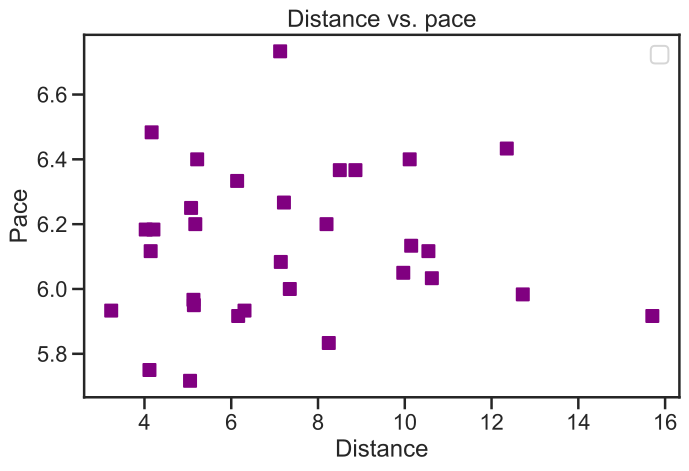
It still does not give us a clear trend, but it depicts that she really started to achieve better performance when she started to run longer distances (paces loweer then 6’20 when she started to run above 10km).
Finally, let’s see her performance evolution in pace over time in 5km, 10km and 15kms. For this analysis, I had to filter the session dataframe based on distances. In this tutorial, I will assume that the distances between 5km - 5.9km , 10km - 10.9km, 15km - 15.9km will be normalized as 5, 10 , 15km.
[54]:
summary_without_outliers_5km = summary_without_outliers[summary_without_outliers['total_distance'].between(5000,5900)]
summary_without_outliers_10km = summary_without_outliers[summary_without_outliers['total_distance'].between(10000,10900)]
summary_without_outliers_15km = summary_without_outliers[summary_without_outliers['total_distance'].between(15000,15900)]
[61]:
fig, axs = plt.subplots(3, sharex=True, figsize=(18, 16))
fig.suptitle('Average Moving Pace over time (5km, 10km, 15km)')

axs[0].plot(summary_without_outliers_5km.index, summary_without_outliers_5km.mean_moving_pace_float, marker='*')
axs[0].set_title('5km')

axs[1].plot(summary_without_outliers_10km.index, summary_without_outliers_10km.mean_moving_pace_float, marker='*')
axs[1].set_title('10km')


axs[2].plot(summary_without_outliers_15km.index, summary_without_outliers_15km.mean_moving_pace_float, marker='*')
axs[2].set_title('15km')

plt.xlabel('Date')

plt.show()
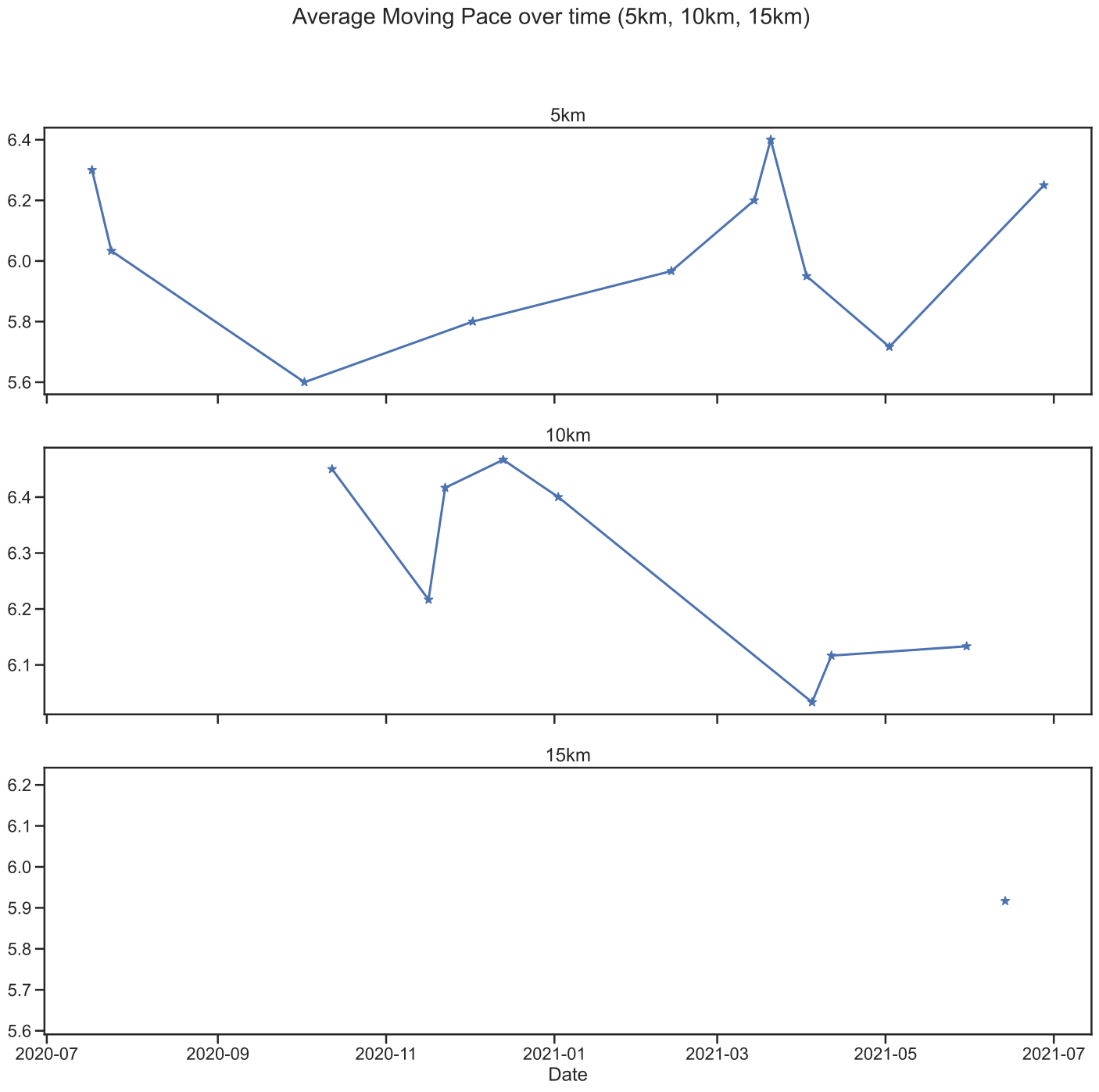
Her 5km got better until semptember 2020, but as she started to get greater distances, her performance got more slower. He 10km got better across 2021. Her 15km, since we only have one observation, there’s no insight/trend there.
Conclusions#
So, as expected, no major insight. However, always running help he to improve her performance, in order to maintain or lower her pace.
She started to run greater distances with excelent paces, for instance the distance run of 15km with the moving pace 5’50.
There is no trend about her run distance vs pace. We believe that we need to collect more data to might see any new insights.
In this tutorial, we showed the possibilities of using runpandas python package to perform several type of running analysis assisted by visualization and data handling packages such as Matplotlib and pandas. With the introduction of session feature, we now can analyse a group of activities and investigate new insights over time.